TAFCOP is an online service launched by the Department of Telecommunications (DoT), Government of India, to help mobile users verify how many SIM cards are issued in their name. Through this portal, users can identify unauthorized mobile connections, report suspicious numbers, and protect themselves from identity misuse and SIM-related fraud.
The full form of TAFCOP is Telecom Analytics for Fraud Management and Consumer Protection. It is part of the government’s initiative to increase transparency and strengthen digital security for telecom consumers.
CHAKSHU – REPORT SUSPECTED FRAUD COMMUNICATION / UCC (SPAM) / SUSPECTED WEB LINKS
BLOCK YOUR LOST / STOLEN MOBILE HANDSET
KNOW MOBILE CONNECTIONS IN YOUR NAME
KNOW GENUINENESS OF YOUR MOBILE HANDSET
REPORT INCOMING INTERNATIONAL CALL WITH INDIAN NUMBER
KNOW YOUR WIRELINE INTERNET SERVICE PROVIDER
TRUSTED CONTACT DETAILS
What is the TAFCOP Portal?
The official TAFCOP platform is available at tafcop.sancharsaathi.gov.in
This government portal allows individuals to:
- View all active SIM cards registered under their name or Aadhaar.
- Report unknown or unnecessary mobile numbers.
- Prevent identity theft and telecom fraud.
- Maintain better control over their mobile connections.
As per Indian telecom regulations, an individual can register up to 9 SIM cards under their name. However, in Jammu & Kashmir, Assam, and North-Eastern states, the limit is 6 SIM cards.
Why Should You Use TAFCOP?
In the past, SIM card fraud was a serious issue in India. Fraudsters often misused Aadhaar details to obtain SIM cards in someone else’s name and sold them illegally. This led to identity theft, financial scams, and legal complications for innocent individuals.
TAFCOP helps solve this problem by:
- Providing complete visibility of mobile numbers linked to your identity.
- Allowing quick reporting of unauthorized numbers.
- Reducing telecom-related fraud across the country.
- Enhancing consumer safety and digital accountability.
Regular checks on the portal can prevent future misuse of your identity.
How to Check Active SIM Cards Linked to Your Name
- 1. Visit the official TAFCOP website : Go to tafcop.sancharsaathi.gov.in
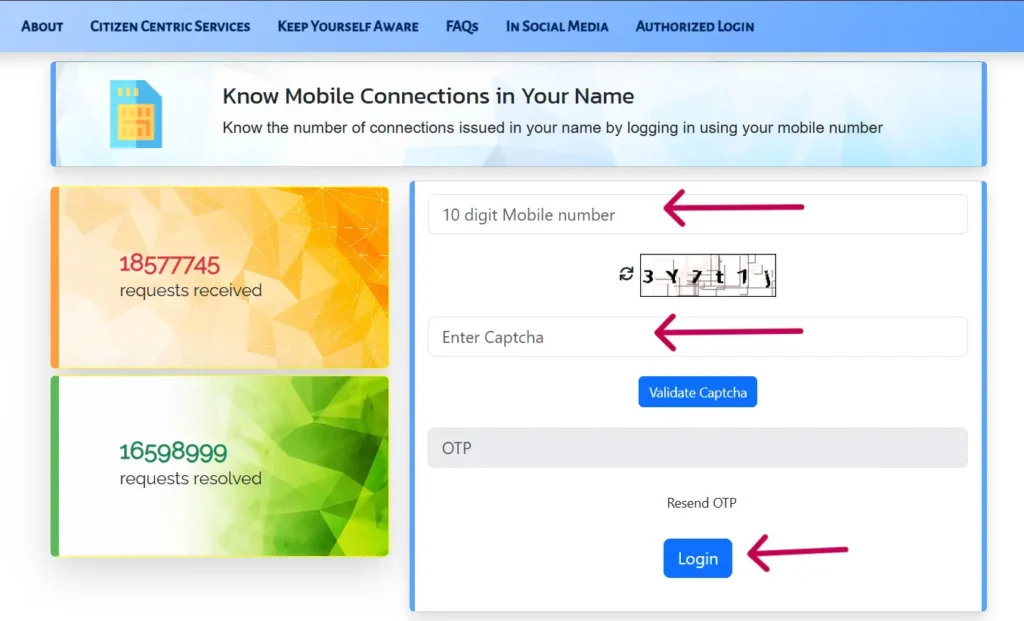
- 2. Enter your mobile number : Use the number that is registered with your Aadhaar.
- 3. Complete the captcha verification : Enter the displayed captcha and click on Validate Captcha.
- 4. Verify using OTP : You will receive an OTP on your mobile. Enter it and click Login.
- 5. View active connections
- A list of mobile numbers linked to your Aadhaar will appear.
- For privacy reasons, only the first two and last four digits of each number are shown.
How to Report and Block Unauthorized SIM Cards
If you notice a number that you do not recognize, you can report it easily.
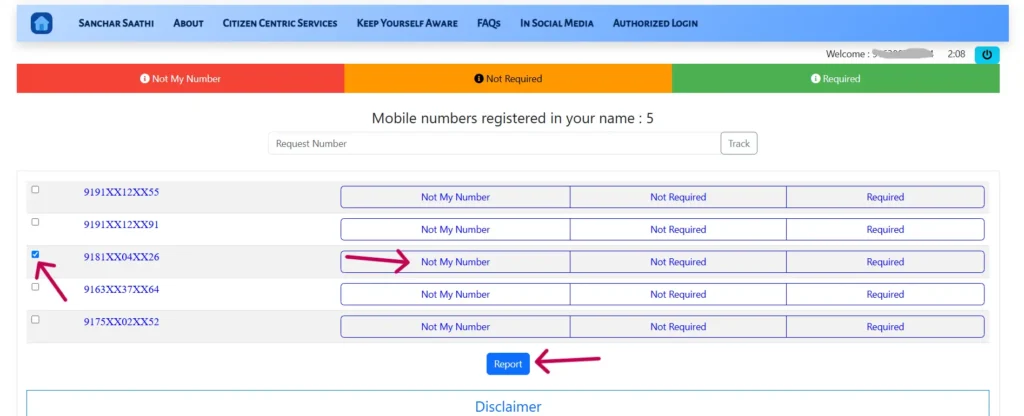
After logging in, Review the list carefully. You will see three options next to each number:
- Not My Number – Select if the number does not belong to you.
- Not Required – Select if it belongs to you but is no longer needed.
- Required – Select if you are actively using the number.
To Report a Number:
- Tick the checkbox next to the suspicious number.
- Choose Not My Number or Not Required.
- Click on the Report button.
- Confirm the action when prompted.
Your complaint will be submitted, and the telecom provider will take necessary action to deactivate the number.
⚠️ Important: Double-check before reporting. Do not accidentally block a number used by you or a family member.
What is SIM Card Fraud & How to Prevent It?
SIM fraud occurs when someone obtains a mobile connection using your personal details without your consent. This can lead to:
- Identity theft
- Financial fraud
- Legal complications
How to Stay Protected:
- Regularly check your active SIMs on the TAFCOP portal.
- Immediately report unknown numbers.
- Never share Aadhaar or OTP details with anyone.
- Keep your personal documents secure.
Thanks to TAFCOP, telecom consumers now have better protection and transparency.
TAFCOP Help & Support
If you face issues while reporting a number or need assistance, you can contact the official support team under the government’s Sanchar Saathi initiative.
📧 Support Email : help-sancharsaathi@gov.in
The support team will review your concern and assist accordingly.
(FAQs)
Q1. How many SIM cards can a person register in India?
A person can register up to 9 SIM cards in most states. In Jammu & Kashmir, Assam, and North-Eastern states, the limit is 6.
Q2. Is TAFCOP a government service?
Yes, TAFCOP is an official service managed by the Department of Telecommunications under the Government of India.
Q3. Is TAFCOP a genuine website?
Yes, it is an official government portal designed for telecom consumer protection.
Q4. How do I check SIM cards linked to my Aadhaar?
Visit the TAFCOP website, enter your mobile number, complete captcha verification, and confirm with OTP to view linked numbers.
Q5. How can I deactivate an unauthorized SIM?
Log in to the portal, select the suspicious number, choose the appropriate option (Not My Number/Not Required), and submit a report.